
CPanel GSC Verification SOP
Log in to cPanel
- Access your cPanel by navigating to yourdomain.com/cpanel and logging in.
Go to Zone Editor
- Look for the Zone Editor under the Domains section.
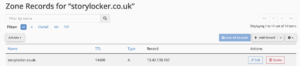
- Click Manage next to the domain you want to verify.

Add a TXT Record
- Click on Add Record → Select TXT Record.
- In the Name field, enter your domain name (e.g., example.com).
- In the TTL field, leave the default value (e.g., 14400).
- In the TXT Data field, paste the verification code from GSC.

Save the Record
- Click Save Record or Add Record to apply the changes.
Wait for Propagation
- DNS changes may take some time to propagate (usually a few minutes to 24 hours).
Verify in Google Search Console
- Go back to GSC, click Verify, and wait for Google to confirm the verification.