
Linking SOP
Linking is a crucial element of good SEO. It is a key part of the basic SEO practices that we employ as linking either externally or internally demonstrates a number of positive signals to search engines.
Internally Linking:
Internal linking is the practice of linking from one page on the client site to another, this is crucial from a technical point of view as it creates ease for web crawling and ultimately indexation, as well as giving context to what the page is about, by linking to a similar topic on another page, Google can begin to better understand the content it is crawling. UX is a big factor also, as all of us have at one time or another followed an internal link to a relevant page about the same topic we were researching.
The best at this practice is Wikipedia:
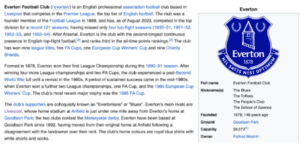
In this screengrab alone is 26 internal links, and the snippet makes up 1/20th of the page.
It is important to not overdo internal linking, however. This is from the Google developer’s site offering guidance on internal linking:

Google wants relevance, as it wants to offer a good experience to its users and wants to crawl the site more efficiently so you can’t simply add a load of internal links with no relevancy in the hope this will rank better with Google.
Anchor text is the term given to describe the actual linked piece of text which will send the user to the page you have linked to when they click on it.
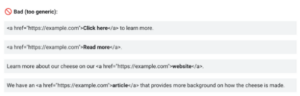
Google wants descriptive anchor texts, why? Adds context for when Google and other search engines crawl the linked page and want to offer the same positive UX to the user. Here are examples of bad anchor text:
It lists linked text like:
- Click here
- Read more
- Article
As too generic, with no context given to crawlers or users about the page that is being linked to. Google offers this advice as well:

Here is a given example of how Google encourages internal linking:
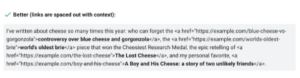
What I take from this is that context and relevancy are prominent, but frequency also. Google doesn’t mind multiple links in a blob of content as long as there is relevancy.
External Linking
Externally linking does all the same as the above but adds another layer of trustworthiness. In the example of Patrick Cannon’s insights section of the site where he is gathering statistical data, it is key to link to these sources to demonstrate trustworthiness to Google and the user. Externally linking shouldn’t be feared and you should only use the nofollow attribute when you don’t trust the source you’re citing.
External links are reflected in the overall score:

And here is SearchEnginge Land advice:
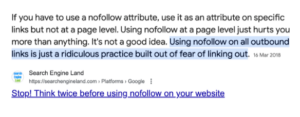
There is no credible encouragement from trusted sources to no follow all external links despite what might be said in the SEO community.
Adding a link
Adding an internal or external link is the same and very straightforward.
First access the CMS of the site you want to add the link.
Navigate to the page or blog post you want to add the link to

Highlight the blob of text you want to be the hyperlink
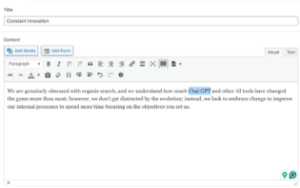
Click the button that looks like a chain
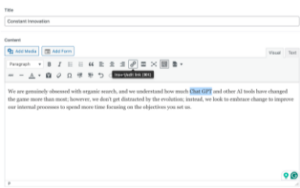
When you click it a box will appear below the highlighted text, here you need to insert the URL of the page you want to link to and click enter.
To confirm it has worked, the text should change to the blue hyperlink. Test the link as well by clicking it to make sure it travels to the page you intended it to.

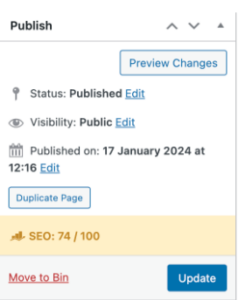
You finally need to update the page to confirm the change on the front end.
Sources:
https://developers.google.com/search/docs/crawling-indexing/links-crawlable